


ユーザーマニュアル
オーディオトラック選択

オーディオトラックピッカーは、現在のコードチャートに一致するすべてのトラックを名前で表示します。さらに、このメニューはあなたが選択したカスタムトラックを表示します。各トラックについて、アルバムアートワーク(利用可能な場合)、トラック名、およびアーティスト名が表示されます。
オーディオ再生設定
レンチアイコンをタップすると、オーディオ再生設定を変更できる画面が開きます。完了をタップして変更を保存し画面を閉じるか、キャンセルをタップして変更を保存せずに画面を閉じます。
一致するオーディオトラックへのリンク
コードチャートに関連付けたいオーディオトラックをタップします。デフォルトでは、OnSongは名前で一致する最初に見つかったトラックをリンクします。チェックマークが現在リンクされているトラックの隣に表示されます。コードチャートからトラックのリンクを解除したい場合は、チェックされたトラックをタップしてチェックを外します。これにより、オーディオトラックがコードチャートに関連付けられなくなります。
カスタムオーディオトラックへのリンク
iTunes音楽ライブラリまたはOnSongメディアライブラリからトラックを選択するには、右下隅の+ボタンをタップして、音楽を閲覧できるカスタムトラックを選択メニューを開きます。
自動マッチング
デフォルトでは、コードチャートの正確なタイトルとオーディオトラックを比較してトラックが自動的にリンクされます。OnSongがトラックをマッチングする方法を変更するか、設定 » ライブ設定 » オーディオ再生 » トラックを自動的にリンクでこの機能を無効にできます。
マッチには、iCloudで見つかったオーディオトラックが含まれることがあります。これらのオプションは設定 » ライブ設定 » ライブバー » オーディオ » iCloudの音楽を表示から削除できます。
期間とテンポを取得
画面下部のこのスイッチは、期間とテンポが選択されたオーディオトラックから取得されるかどうかを決定します。有効にされている場合、OnSongは曲の期間を選択されたトラックの期間に一致するように変更します。テンポ情報がトラック内で利用可能な場合、有効になっていれば曲のテンポが更新されます。
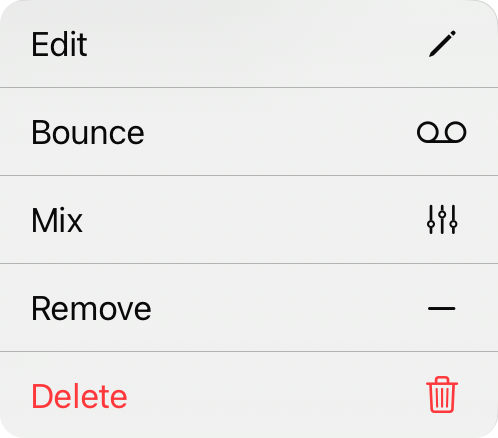
コンテキストメニュー
リスト内の各項目の追加アクションには、項目を長押しするか右クリックでアクセスできるコンテキストメニューを使用できます。アクションには以下が含まれます:
- 編集はオーディオメディアエディタを開きます。ここでトラックに変更を加えることができます。
- バウンスは、現在のミックスでファイルをステレオの圧縮トラックに変換します。
- ミックスはミキサーウィジェットを開きます。これがマルチトラックの場合、ミックスできます。
- 削除は、このソングの利用可能なトラックからトラックを削除します。
- 永久削除はライブラリからトラックを永久に削除します。


